A minimalist introduction to Ansible
2026-04-14
Your rich uncle left a big piece of land and ferral cattle for you. In other words, you got a farm.
Photo by Nikola from Pexels: https://www.pexels.com/photo/brown-cattles-on-green-grass-field-5920923/
The only access to the farm is a dirty road.
Photo by Harrison Haines from Pexels: https://www.pexels.com/photo/empty-wet-clay-path-between-lush-forests-5557977/
When you arrive to the farm, your first task is to build a fence around your property and, later, to build some infrastructure for the cattle.
Photo by Ksenia Chernaya from Pexels: https://www.pexels.com/photo/set-of-various-tools-in-box-5691650/
But, first, you need to select a hammer to use in your project.
Photo by cottonbro studio from Pexels: https://www.pexels.com/photo/hammer-and-mallets-hanging-on-the-wall-7484795/
Ansible is your new hammer to …
Create users
Install and configure applications
Manage system units
Create or modify files
…
Ansible requires …
SSH server configured in the server
Credentials (user name + password or SSH key) to access the server
Optionally, super user rights in the server
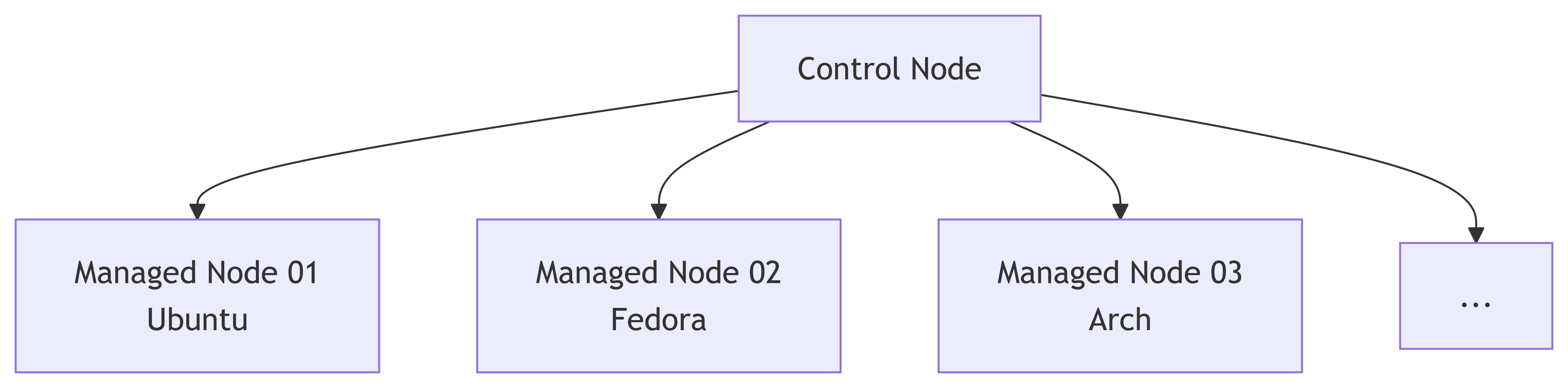
Ansible uses a push model
Only the control node needs to have Ansible installed.
python -m pip install ansible
flowchart LR c[Control Node] m1[Managed Node 01
c --> m1
c --> m2
c --> m3
c --> m4
s --> c
u --> s

subgraph n[Container Network]
    c
    m1
    m2
    m3
    m4
end
style n fill:#FFB000,stroke:#FFB000

subgraph h[Host]
    s
    n
end
style h fill:#648FFF,stroke:#648FFF
Lesson #1
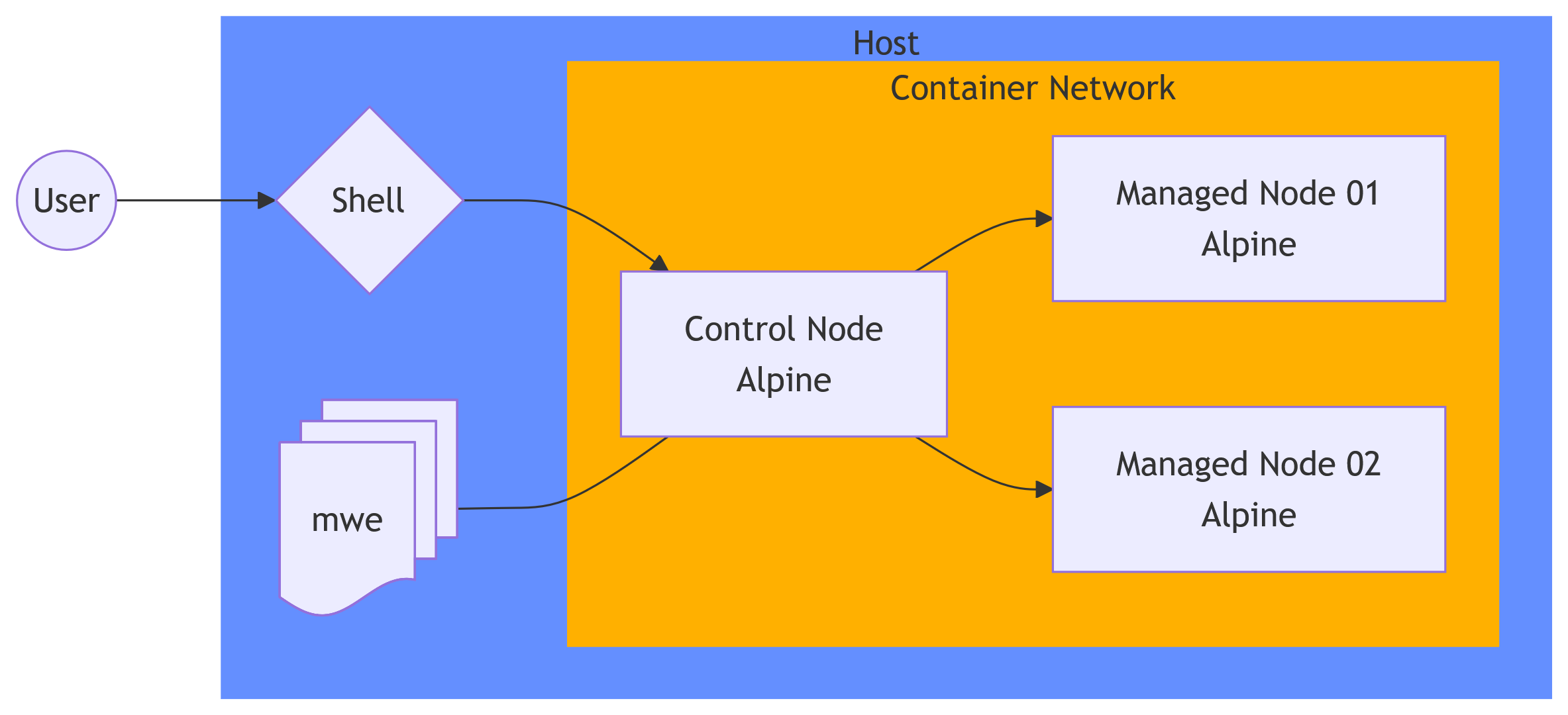
You can learn using a single device that runs a multi-container network.
This approach is faster and easy to configure and tear down. This allows learners to try things multiple time with almost zero cost.
We will use this approach during this tutorial. Please download https://rgaiacs.github.io/2026-pycon-de-ansible/sandbox.zip .
Lesson #1 - Diagram for our network
flowchart LR c[Control Node
c --> m1
c --> m2
s --> c
u --> s
d --- c

subgraph n[Container Network]
    c
    m1
    m2
end
style n fill:#FFB000,stroke:#FFB000

subgraph h[Host]
    s
    n
    d
end
style h fill:#648FFF,stroke:#648FFF
Lesson #1 - Snippet
Podman
unzip sandbox.zippodman kube play --replace play.ymlpodman pspodman exec \ -it ansible-cnode-cnode \ ssh ansible-mnode-01 truessh ansible-mnode-02 true
Docker
unzip sandbox.zipdocker compose -p pyconde up --detach docker psdocker exec \ -it pyconde-ansible-cnode-1 \ ssh ansible-mnode-01 truessh ansible-mnode-02 true
Password is 123.
Concepts
Inventory
Define and group the nodes in the network.
Playbook
Define and map commands to groups or nodes.
Inventory
Syntax
group-name : hosts : host-name : variable-key : variable-value variable-key : variable-value vars : gvariable-key : gvariable-value gvariable-key : gvariable-value
Example
web : hosts : ansible-mnode-01 : ansible_password : 123 pet : corn snake ansible-mnode-02 : ansible_password : 123 pet : milk snake vars : ansible_user : ansible
Use ansible-vault for passwords.
Lesson #2
You can run a single task against a inventory. For example,
ansible \ --inventory inventories/pyconde2026.yaml \ --check \ --module-name community.general.apk \ --args "name=python3" \ This is very useful for “manual” interventions, for example
rebooting servers
rebooting services
updating caching of packages
Lesson #2 - More examples
ansible \ --inventory inventories/pyconde2026.yaml \ --check \ --module-name community.general.apk \ --args "name=python3-dev" \ ansible \ --inventory inventories/pyconde2026.yaml \ --check \ --module-name community.general.apk \ --args "update_cache=true" \
Lesson #3
Some tasks requires elevate privilegies, for example, sudo. The elevate privilegies can be provided with the become argument.
ansible \ --inventory inventories/pyconde2026.yaml \ --become \ --ask-become-pass \ --module-name community.general.apk \ --args "update_cache=true" \
Playbook
Syntax
- name : play-name-value play-extra-key : play-extra-value play-extra-key : play-extra-value tasks : - name : task-name-value fully.qualified.module.name : module-key : module-value module-key : module-value - name : task-name-value fully.qualified.module.name : module-key : module-value module-key : module-value
Example
- name : My first play hosts : - web gather_facts : false tasks : - name : Print message ansible.builtin.debug : msg : My pet is {{ pet }}
Lesson #4
Variables allow you to re-use the same playbook but produce output with small differences in each target server.
ansible-playbook \ --inventory inventories/pyconde2026.yaml \
Lesson #5
You can define variables in multiple places but you should be careful to avoid the precedence trap. My recommendation is to limit variables to
[lowest precedence] role defaults
inventory file
[highest precedence] command-line extra variables (for example, -e "user=pyconde" or -e @vault/file.yaml)
Lesson #6
Ansible uses Jinja to handle the variables. And Ansible comes with extra batteries for Jinja’s builtin filters .
- name : Example of filter hosts : all gather_facts : false tasks : - name : Print message ansible.builtin.debug : msg : My pet's name has {{ pet | wordcount}} words.
Lesson #7
Ansible includes a couple of special variables: connection variables, magic variables, and facts.
- name : Example of variables hosts : all tasks : - name : Variable from inventory ansible.builtin.debug : msg : My pet is {{ pet }} - name : Magic variable ansible.builtin.debug : msg : Current play is {{ ansible_play_name }} - name : Fact ansible.builtin.debug : msg : User UID is {{ ansible_facts.user_uid }}
Lesson #8
Gathering of facts is expensive and happens before every play.
- name : My first play hosts : all tasks : - name : Print message ansible.builtin.debug : msg : My pet is {{ pet }} - name : My second play hosts : all tasks : - name : Print message ansible.builtin.debug : msg : My pet is {{ pet }} Gathering of facts can be disable with gather_facts: false.
Lesson #9 - Loops
Any task can use the attribute loop to repeat it for each item.
- name : Example of loop hosts : all gather_facts : false tasks : - name : Print message loop : - "3.10" - "3.11" - "3.12" - "3.13" - "3.14" ansible.builtin.debug : msg : Testing with python {{ item }}
Lesson #10 - Conditionals
Any task can use the attribute when to filter when it is executed.
- name : Example of conditional hosts : all gather_facts : false tasks : - name : Print corn when : pet == "corn snake" ansible.builtin.debug : msg : Testing 🍿 - name : Print milk when : pet == "milk snake" ansible.builtin.debug : msg : Testing 🥛
Small project
Write a Flask “Hello World”.
Deploy a testing version to ansible-mnode-02.
Deploy a production version to ansible-mnode-01.
Inventories for small project
Acceptance
flask : hosts : ansible-mnode-02 : ansible_user : ansible ansible_password : 123
Production
flask : hosts : ansible-mnode-01 : ansible_user : ansible ansible_password : 123
Flask “Hello World”
From Flask’s Quickstart :
import osfrom flask import Flask= os.getenv("DEMO_ENV" , default= None )= Flask(__name__ )@app.route ("/" )def hello_world():return f"<p class=' {{ env_name }} '>Hello, World!</p>"
Install dependencies
- name : Install Flask become : true community.general.apk : name : py3-flask update_cache : true
Create folder
- name : Create folder ansible.builtin.file : path : /home/ansible/app state : directory owner : ansible group : ansible mode : u=rwx,g=rx,o=rx
Create README
- name : Create README file ansible.builtin.copy : content : | dest : /home/ansible/app/README.md owner : ansible group : ansible mode : u=rw,g=r,o=r
Copy app source code
- name : Copy Flask app source code ansible.builtin.copy : src : demo.py dest : /home/ansible/app/demo.py owner : ansible group : ansible mode : u=rw,g=r,o=r
Create start app script
- name : Render start script ansible.builtin.template : src : demo-start.sh dest : /home/ansible/app/demo-start.sh owner : ansible group : ansible mode : u=rwx,g=rx,o=rx demo-start.sh is
#!/bin/sh = {{ inventory_file | basename | splitext | first }}- m flask \ -- app demo.py \ \ -- host 0.0.0.0 \ -- port 8080
Start server
The container image that we are using does not include systemd . To keep the app running, we use nohup.
- name : Start server ansible.builtin.shell : chdir : /home/ansible/app cmd : nohup ./demo-start.sh &
Assert
The demo-start.sh is very simple and does not include assessment if the the Flask app is running. We can include a task to check it.
- name : Assert that server is running ansible.builtin.uri : url : "http://localhost:8080"
Test
ansible-playbook \ --ask-become-pass \ --inventory inventories/acceptance.yaml \ wget -O - ansible-mnode-02:8080 | cat ansible-playbook \ --ask-become-pass \ --inventory inventories/production.yaml \ wget -O - ansible-mnode-01:8080 | cat
Provisioning vs Configuration vs Deployment
Provisioning
Creation of (virtual) server.
Configuration
Installation of packages to (virtual) server, e.g. container runtime.
Deployment
Copy and start of application to (virtual) server and can rollback to old version if necessary.
Lesson #11
Ansible can be used as part of the continuous integration and deployment workflow.
And you might want to organise separate playbooks for provisioning, configuration, and deployment.
Lesson #12
Ansible has plugins to handle provision, including for
Lesson #13
Ansible can be configured to performe a rollback if necessary by using block and rescue attributes.
Lesson #14
Advance plays might be organised using
pre_tasksrolestaskspost_taskshandlers
Lesson #15
Ansible Galaxy is a community marketplace for collections and roles.